
API Performance Optimisation Best Practices

1. Implement effective caching: Utilize server-side and client-side caching (e.g., Redis) and leverage HTTP cache headers.
This Spring Boot code demonstrates effective caching by combining server-side caching using Redis and client-side caching using HTTP cache headers.
At the server side, Spring’s caching abstraction is enabled using @EnableCaching. The @Cacheable annotation in the service layer stores the result of a method call in Redis. When a request for the same data is made again, Spring first checks Redis and returns the cached value instead of executing the method (e.g., avoiding a database call). A TTL (time-to-live) is configured so cached data automatically expires after a defined duration.
At the client side, the REST controller adds HTTP cache headers such as Cache-Control and ETag to the response. Cache-Control allows browsers or CDNs to cache the response for a specified time, while ETag enables conditional requests. If the data has not changed, the server can respond with 304 Not Modified, reducing bandwidth and improving performance.
1.Dependencies
1
2
3
4
5
6
7
8
9
10
11
12
13
14
15
16
17
18
19
20
21
22
23
24
25
<dependencies>
    <!-- Spring Web -->
    <dependency>
        <groupId>org.springframework.boot</groupId>
        <artifactId>spring-boot-starter-web</artifactId>
    </dependency>

    <!-- Spring Cache -->
    <dependency>
        <groupId>org.springframework.boot</groupId>
        <artifactId>spring-boot-starter-cache</artifactId>
    </dependency>

    <!-- Redis -->
    <dependency>
        <groupId>org.springframework.boot</groupId>
        <artifactId>spring-boot-starter-data-redis</artifactId>
    </dependency>

    <!-- Jackson (for Redis serialization) -->
    <dependency>
        <groupId>com.fasterxml.jackson.core</groupId>
        <artifactId>jackson-databind</artifactId>
    </dependency>
</dependencies>
2.Enable Caching
1
2
3
4
5
6
7
@SpringBootApplication
@EnableCaching
public class CachingApplication {
    public static void main(String[] args) {
        SpringApplication.run(CachingApplication.class, args);
    }
}
3.Redis Configuration
1
2
3
4
5
6
7
8
9
10
@Configuration
public class RedisConfig {

    @Bean
    public RedisCacheConfiguration cacheConfiguration() {
        return RedisCacheConfiguration.defaultCacheConfig()
                .entryTtl(Duration.ofMinutes(10)) // cache TTL
                .disableCachingNullValues();
    }
}
4.Service Layer (Server-Side Caching)
- First call will hit the DB.
- Next call will be served from Redis.
1
2
3
4
5
6
7
8
9
10
11
12
13
14
15
@Service
public class ProductService {

    @Cacheable(value = "products", key = "#id")
    public Product getProductById(Long id) {
        simulateSlowCall();
        return new Product(id, "Product-" + id, 100.0);
    }

    private void simulateSlowCall() {
        try {
            Thread.sleep(2000); // simulate DB call
        } catch (InterruptedException ignored) {}
    }
}
5.REST Controller (Client-Side Caching via HTTP Headers)
- Cache-Control: public, max-age=60
- Browser/CDN caches response for 60 seconds
- ETag enables conditional requests (304 Not Modified)
1
2
3
4
5
6
7
8
9
10
11
12
13
14
15
16
17
18
19
20
21
22
@RestController
@RequestMapping("/products")
public class ProductController {

    private final ProductService productService;

    public ProductController(ProductService productService) {
        this.productService = productService;
    }

    @GetMapping("/{id}")
    public ResponseEntity<Product> getProduct(@PathVariable Long id) {
        Product product = productService.getProductById(id);

        String eTag = Integer.toHexString(product.hashCode());

        return ResponseEntity.ok()
                .cacheControl(CacheControl.maxAge(60, TimeUnit.SECONDS).cachePublic())
                .eTag(eTag)
                .body(product);
    }
}
6.Model Class (Java 17)
1
public record Product(Long id, String name, Double price) {}
7.application.properties
1
2
spring.redis.host=localhost
spring.redis.port=6379
2. Use asynchronous processing: Offload long-running tasks via queues and background workers to keep endpoints responsive.
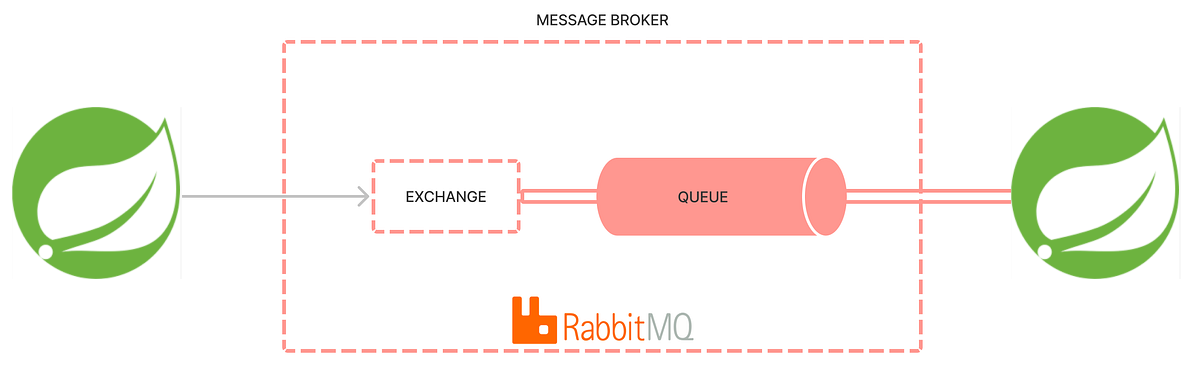
To keep REST APIs responsive while handling long-running tasks, we use RabbitMQ as a message queue. Instead of processing heavy work inside the HTTP request thread, the application publishes a message to a RabbitMQ queue and returns the response immediately. A background consumer then processes the task asynchronously.
Working
- The REST controller receives a request and creates a task message.
- The message is published to a durable RabbitMQ queue using RabbitTemplate.
- The API responds immediately with 202 Accepted.
- A RabbitMQ consumer (@RabbitListener) listens to the queue and processes messages in the background.
- RabbitMQ handles buffering, retries, and scalability, ensuring tasks are not lost.
This approach decouples API responsiveness from task execution, supports horizontal scaling, survives application restarts, and is suitable for production workloads such as file processing, notifications, and integrations.
1.Dependencies
1
2
3
4
5
6
7
8
9
10
11
12
13
14
15
16
17
<dependencies>
    <dependency>
        <groupId>org.springframework.boot</groupId>
        <artifactId>spring-boot-starter-web</artifactId>
    </dependency>

    <dependency>
        <groupId>org.springframework.boot</groupId>
        <artifactId>spring-boot-starter-amqp</artifactId>
    </dependency>

    <dependency>
        <groupId>org.projectlombok</groupId>
        <artifactId>lombok</artifactId>
        <scope>provided</scope>
    </dependency>
</dependencies>
2.RabbitMQ configuration
1
2
3
4
5
6
7
8
9
10
11
12
13
14
15
@Configuration
public class RabbitMQConfig {

    public static final String QUEUE_NAME = "long-running-task-queue";

    @Bean
    public Queue taskQueue() {
        return new Queue(QUEUE_NAME, true);
    }

    @Bean
    public MessageConverter messageConverter() {
        return new Jackson2JsonMessageConverter();
    }
}
3.Message payload
1
2
3
4
5
6
7
@Data
@NoArgsConstructor
@AllArgsConstructor
@Builder
public class TaskMessage {
    private String taskId;
}
4.Producer (publishes tasks to RabbitMQ)
1
2
3
4
5
6
7
8
9
10
@Service
@RequiredArgsConstructor
public class TaskProducer {

    private final RabbitTemplate rabbitTemplate;

    public void send(TaskMessage message) {
        rabbitTemplate.convertAndSend(RabbitMQConfig.QUEUE_NAME, message);
    }
}
5.Consumer (background worker)
1
2
3
4
5
6
7
8
9
10
@Service
public class TaskConsumer {

    @RabbitListener(queues = RabbitMQConfig.QUEUE_NAME)
    public void process(TaskMessage message) throws InterruptedException {
        System.out.println("Processing task: " + message.getTaskId());
        Thread.sleep(5000);
        System.out.println("Completed task: " + message.getTaskId());
    }
}
6.REST Controller (fast and responsive endpoint)
1
2
3
4
5
6
7
8
9
10
11
12
13
14
@RestController
@RequestMapping("/tasks")
@RequiredArgsConstructor
public class TaskController {

    private final TaskProducer producer;

    @PostMapping("/start")
    public ResponseEntity<String> startTask() {
        String taskId = UUID.randomUUID().toString();
        producer.send(TaskMessage.builder().taskId(taskId).build());
        return ResponseEntity.accepted().body("Task queued: " + taskId);
    }
}
7.application.properties
1
2
3
4
spring.rabbitmq.host=localhost
spring.rabbitmq.port=5672
spring.rabbitmq.username=guest
spring.rabbitmq.password=guest
3. Enable pagination: Process large data sets in manageable chunks.
Spring Boot, together with Spring Data JPA, provides built-in support for pagination through the Pageable abstraction. Pagination helps retrieve large datasets in manageable chunks, improving application performance, response times, and user experience.
Using pagination, the application avoids loading the entire result set into memory and instead fetches only a subset of records per request, typically implemented at the database level using LIMIT and OFFSET (for MySQL and compatible databases).
Spring Data JPA exposes pagination via:
Pageable – Defines page number, page size, and sorting
Page<T> – Represents paginated data along with metadata
Benefits of Using Pagination
1. Performance Optimization
Prevents loading large datasets into memory and reduces database load.
2. Scalability
Enables APIs to scale efficiently as data grows.
3. Improved User Experience
Supports page-by-page navigation and faster UI rendering.
4. Clean API Design
Pagination metadata (total pages, total elements) is automatically provided.
5. Database-Agnostic
JPA translates pagination to database-specific SQL.
1.Entity
1
2
3
4
5
6
7
8
9
10
11
12
13
@Entity
@Table(name = "users")
public class User {

    @Id
    @GeneratedValue(strategy = GenerationType.IDENTITY)
    private Long id;

    private String name;
    private String email;

    // getters & setters
}
2.Repository
1
2
public interface UserRepository extends JpaRepository<User, Long> {
}
3.Service
1
2
3
4
5
6
7
8
9
10
11
@Service
public class UserService {

    @Autowired
    private UserRepository repository;

    public Page<User> getUsers(int page, int size) {
        Pageable pageable = PageRequest.of(page, size, Sort.by("id"));
        return repository.findAll(pageable);
    }
}
4.Controller
1
2
3
4
5
6
7
8
9
10
11
12
13
14
15
@RestController
@RequestMapping("/api/users")
public class UserController {

    @Autowired
    private UserService service;

    @GetMapping
    public Page<User> getUsers(
            @RequestParam(defaultValue = "0") int page,
            @RequestParam(defaultValue = "10") int size
    ) {
        return service.getUsers(page, size);
    }
}
5.What Hibernate generates (MySQL)
1
2
3
4
5
6
7
select user0_.id as id1_1_0_,
       user0_.name as name2_1_0_,
       user0_.email as email3_1_0_
from user user0_
order by user0_.id asc limit 10 offset 0

select count(id) as col_0_0_1_ from user user1_
Page<T>always triggers an additional COUNT(*) query which can sometimes be expensive on large tables.
Ensure indexes exist on columns used for sorting and filtering.
Never allow unbounded page sizes from clients. Always enforce a maximum page size (e.g., 50/100).
4.Optimize database queries: Use indexes, reduce N+1 query problems, and ensure optimal ORM configurations.
The N+1 problem is the situation when, for a single request, for example, fetching Orders, we make additional requests for each Order to get their information. Although this problem often is connected to lazy loading, it’s not always the case.
We can get this issue with any type of relationship. However, it usually arises from many-to-many or one-to-many relationships.
Example scenario
- Fetch 3 Order entities
- Each Order has a lazy-loaded
List<OrderItem> - Hibernate runs:
1
2
1 query → select * from orders
3 queries → select * from order_item where order_id = ?
Why it’s bad
- Poor performance
- Excessive DB round-trips
- Scales badly under load
Entity Mapping
1
2
3
4
5
6
7
8
9
10
11
12
@Entity
public class Order {

    @Id
    @GeneratedValue
    private Long id;

    private String customer;

    @OneToMany(mappedBy = "order", fetch = FetchType.LAZY)
    private List<OrderItem> items;
}
1
2
3
4
5
6
7
8
9
10
11
12
@Entity
public class OrderItem {

    @Id
    @GeneratedValue
    private Long id;

    private String product;

    @ManyToOne
    private Order order;
}
Repository (Triggers N+1)
1
2
3
4
@Repository
public interface OrderRepository extends JpaRepository<Order, Long> {
    List<Order> findAll();
}
Generated SQL queries
Assuming 3 Orders exist
1
2
3
4
5
6
7
8
9
10
11
12
13
14
15
# initial query
SELECT * FROM order_table o0_

# lazy loading N=3 queries
SELECT oi.* FROM order_item oi0_
LEFT OUTER JOIN order o1_ ON oi0_.order_id=o1_.id
WHERE o1_.id=1

SELECT oi.* FROM order_item oi0_
LEFT OUTER JOIN order o1_ ON oi0_.order_id=o1_.id
WHERE o1_.id=2

SELECT oi.* FROM order_item oi0_
LEFT OUTER JOIN order o1_ ON oi0_.order_id=o1_.id
WHERE o1_.id=3
Fixing the N+1 Problem (Solution 1)
To fix the N+1 problem in the OrderRepository.findAll() query using JOIN FETCH add a custom JPQL method with JOIN FETCH on the items collection.
1
2
3
4
5
6
7
8
9
10
@Repository
public interface OrderRepository extends JpaRepository<Order, Long> {

    @Query("SELECT DISTINCT o FROM Order o LEFT JOIN FETCH o.items")
    List<Order> findAll();

    // OR create a dedicated method
    @Query("SELECT DISTINCT o FROM Order o LEFT JOIN FETCH o.items")
    List<Order> findAllWithItems();
}
Generated SQL (Single query)\
1
2
3
SELECT DISTINCT o.*, oi.*
FROM order_table o
LEFT OUTER JOIN order_item oi ON o.id = oi.order_id
Note: Use the
@Transactional(readOnly = true)service method to ensure the session stays open during iteration.
Fixing the N+1 Problem (Solution 2)
We can also use @EntityGraph(attributePaths = "items") on findAll() which is a clean, declarative way to fix the N+1 problem for the Order->OrderItem relationship, generating a single JOIN query.
1
2
3
4
5
@Repository
public interface OrderRepository extends JpaRepository<Order, Long> {
    @EntityGraph(attributePaths = "items")  // single annotation
    List<Order> findAll();
}
Generated SQL (Single query)\
1
SELECT o.*, oi.* FROM order o LEFT JOIN order_item oi ON o.id=oi.order_id
Some Pro Tips
1.Avoid Open Session in View
1
spring.jpa.open-in-view=false
2.Index Foreign Keys
1
CREATE INDEX idx_order_items_order_id ON order_item(order_id);
3.Monitor SQL & Performance
1
2
spring.jpa.show-sql=true
spring.jpa.properties.hibernate.format_sql=true
4.Avoid Bi-Directional Relationships Unless Needed
5. Use connection pooling: Pool database connections for reuse instead of creating and destroying on each request.
Connection pooling in Spring Boot is a mechanism to manage and reuse database connections instead of creating a new connection for every database request. Since creating a database connection is expensive in terms of time and resources, pooling significantly improves performance and scalability.
What is Connection Pooling?
A connection pool maintains a pool (cache) of open database connections. When the application needs to interact with the database:
1.It borrows a connection from the pool.
2.Executes the query.
3.Returns the connection to the pool instead of closing it.
Spring Boot uses HikariCP as the default connection pool (since Spring Boot 2.x), which is lightweight and high-performance.
Minimal Spring Boot Configuration
1.Maven Dependency (if using JPA)
1
2
3
4
<dependency>
    <groupId>org.springframework.boot</groupId>
    <artifactId>spring-boot-starter-data-jpa</artifactId>
</dependency>
2.Minimal application.properties
1
2
3
4
5
6
7
8
9
10
11
spring.datasource.url=jdbc:mysql://localhost:3306/mydb
spring.datasource.username=root
spring.datasource.password=secret
spring.datasource.driver-class-name=com.mysql.cj.jdbc.Driver

# Hikari Pool configurations (optional)
spring.datasource.hikari.maximum-pool-size=10
spring.datasource.hikari.minimum-idle=5
spring.datasource.hikari.idle-timeout=30000
spring.datasource.hikari.connection-timeout=20000
spring.datasource.hikari.max-lifetime=1800000
Important Parameters:
maximum-pool-size– Maximum number of connections in the pool.minimum-idle– Minimum idle connections maintained.connection-timeout– Time to wait for a connection before timing out.max-lifetime– Maximum lifetime of a connection.
6. Compress payloads: Enable compression (e.g., gzip)
To enable HTTP response compression (gzip) in Apache Tomcat, we need to configure the HTTP Connector in TOMCAT_HOME/conf/server.xml.
1
2
3
4
5
6
7
8
9
<Connector port="8080"
    protocol="org.apache.coyote.http11.Http11NioProtocol"
    connectionTimeout="20000"
    redirectPort="8443"

    compression="on"
    compressionMinSize="1024"
    noCompressionUserAgents="gozilla, traviata"
    compressibleMimeType="text/html,text/xml,text/plain,text/css,text/javascript,application/javascript,application/json,application/xml" />
What Each Attribute Means
compression="on"- Enables gzip compressioncompressionMinSize="1024"- Only compress responses > 1KBnoCompressionUserAgents- Browsers that should not receive compressed responsescompressibleMimeType- MIME types to compress
Verify Compression
1
2
3
4
5
# use a curl call
curl -H "Accept-Encoding: gzip" -I http://localhost:8080

# in the response header look for
Content-Encoding: gzip
Compression
- Reduces bandwidth
- Speeds up page load
- Uses CPU